Nuxt.jsにnuxt/authを導入して、導入したDevise Token Auth向けにテスト(RSpec)を書くで作成したRailsアプリと連携して認証(ログイン・ログアウト)を実装してみました。
authとauth-nextの違い
@nuxtjs/auth-next (v5)
@nuxtjs/auth (v4)
バージョンの違いかな。安定版はv4っぽい。
auth-nextも試しましたが動かなかったので、今回はauthを採用。
nuxt/auth導入
Nuxt.jsでVue.jsに触れてみる で作成したアプリに導入します。
$ yarn add @nuxtjs/auth
package.jsonとyarn.lockが更新される。
nuxt.config.js に追加
  modules: [
    // https://go.nuxtjs.dev/axios
    '@nuxtjs/axios',
+    // https://auth.nuxtjs.org/
+    '@nuxtjs/auth',
    // https://go.nuxtjs.dev/pwa
    '@nuxtjs/pwa'
  ],
tsconfig.json に追加(今回は使わないけど、いずれTypeScriptに書き換えたいので入れておく)
    "types": [
      "@nuxt/types",
      "@nuxtjs/axios",
+      "@nuxtjs/auth",
      "@types/node"
    ]
store/index.js を作成
※空ファイルで良い
nuxt/authの設定
nuxt.config.js に追加
export default {
+  server: {
+    port: 5000
+  },
ポートがRailsアプリと被る。先にRailsを起動して、Nuxt動かせばポート変わるけど、逆だとエラーになるし、RailsのURLを設定するので、序でに変更しておく。
  auth: {
    redirect: {
      login: '/login',
      logout: '/login',
      callback: false,
      home: '/'
    },
    strategies: {
      local: {
        token: {
          property: 'token',
          global: true
        },
        user: {
          property: 'user'
        },
        endpoints: {
          login: { url: 'http://localhost:3000/users/auth/sign_in.json', method: 'post' },
          logout: { url: 'http://localhost:3000/users/auth/sign_out.json', method: 'delete' },
          user: { url: 'http://localhost:3000/users/auth/validate_token.json', method: 'get' }
        }
      }
    }
  },
endpointsは、RailsアプリのDevise Token AuthのURLを設定
ログインページ作成
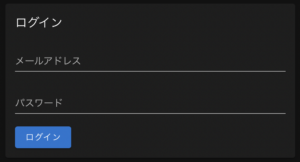
pages/login.vue を作成
<template>
  <v-card max-width="480px">
    <v-form>
      <v-card-title>
        ログイン
      </v-card-title>
      <v-card-text>
        <v-text-field v-model="email" label="メールアドレス" />
        <v-text-field v-model="password" type="password" label="パスワード" />
        <v-btn color="primary" @click="login">
          ログイン
        </v-btn>
      </v-card-text>
    </v-form>
  </v-card>
</template>

<script>
export default {
  middleware: 'auth', // TODO: トップページでalert表示「既にログインしています。」

  data () {
    return {
      email: '',
      password: ''
    }
  },

  methods: {
    async login () {
      await this.$auth.loginWith('local', {
        data: {
          email: this.email,
          password: this.password
        }
      })
        .then((response) => {
          if (response.data.alert) { console.log('[OK]alert: ' + response.data.alert) } // TODO: 遷移元ページでalert表示
          if (response.data.alert) { console.log('[OK]notice: ' + response.data.notice) } // TODO: 遷移元ページでnotice表示
          return response
        },
        (error) => {
          if (typeof error.response === 'undefined') {
            console.log('[ERROR]' + error) // TODO: alert表示
          } else {
            if (error.response.data.alert) { console.log('[NG]alert: ' + error.response.data.alert) } // TODO: alert表示
            if (error.response.data.notice) { console.log('[NG]notice: ' + error.response.data.notice) } // TODO: notice表示
          }
          return error
        })
    }
  }
}
</script>
通信エラーやレスポンスをメッセージ表示させたいけど、今はログに出力して、TODOにしておく。
→ 対応しました。コミットログ参照
https://dev.azure.com/nightonly/nuxt-app-origin/_git/nuxt-app-origin/commit/8d6b7cb6c61470697cc9b5bc4a479aaa84e8b3a2
ログアウトページ作成
アクションだけでも良いですが、確認した方が間違えてログアウトするのを避けられそうなので、ページにしてみました。ネットバックとかで良く見かける。
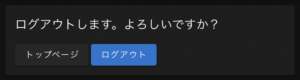
pages/logout.vue を作成
<template>
  <v-card max-width="480px">
    <v-card-title>
      ログアウトします。よろしいですか?
    </v-card-title>
    <v-card-text>
      <v-btn to="/" nuxt>
        トップページ
      </v-btn>
      <v-btn color="primary" @click="logout">
        ログアウト
      </v-btn>
    </v-card-text>
  </v-card>
</template>

<script>
export default {
  middleware: 'auth', // TODO: ログインページでnotice表示「既にログアウト済みです。」

  methods: {
    logout () {
      this.$auth.logout() // TODO: ログインページでnotice表示「ログアウトしました。」
    }
  }
}
</script>
最初、ログインと同じようにレスポンスで制御しようとしましたが、responseがundefinedになりました。logoutWithもなさそう。
そもそも通信に失敗してもフロントはログアウト状態になるので、ハンドリングしても意味がない。
よくよく考えると、サーバーサイドのtoken消すよりも、ユーザーの状態変更を優先した方が良い。
いずれ有効期限切れるし、デフォルト最大10件なので、古いのから追い出されるし。
Devise Token Auth対応
Devise Token Authでは、ヘッダーのuid/client/access-tokenを認証に使うので、このままだとログイン状態を維持できない。→ Devise Token Authの挙動を確認してみた
sign_in.jsonの直後にvalidate_token.jsonが呼ばれ、ヘッダーにuid/client/access-tokenが無いのでtokenチェックに失敗する。

nuxt.config.js に追加
  plugins: [
+    { src: '~/plugins/axios.js' }
  ],
plugins/axios.js を作成
export default function ({ $axios }) {
  $axios.onRequest((config) => {
    // Devise Token Auth
    if (localStorage.getItem('token-type') === 'Bearer' && localStorage.getItem('access-token')) {
      config.headers.uid = localStorage.getItem('uid')
      config.headers.client = localStorage.getItem('client')
      config.headers['access-token'] = localStorage.getItem('access-token')
    }
  })

  $axios.onResponse((response) => {
    // Devise Token Auth
    if (response.headers['token-type'] === 'Bearer' && response.headers['access-token']) {
      localStorage.setItem('token-type', response.headers['token-type'])
      localStorage.setItem('uid', response.headers.uid)
      localStorage.setItem('client', response.headers.client)
      localStorage.setItem('access-token', response.headers['access-token'])
      localStorage.setItem('expiry', response.headers.expiry)
    }
  })
}
Devise Token Auth以外では無視されるようにtoken-typeとaccess-tokenの有無でチェック。
一定時間内のリクエスト(batch_request)はaccess-tokenとexpiryに半角スペース(フロントでは空)になるので、onResponseではaccess-tokenがある場合のみローカルストレージに保存。
クリーニング
消さなくても動くけど、下記でログアウト時にローカルストレージから削除する処理を追加。
pages/logout.vue に追加
-    logout () {
+    async logout () {
-      this.$auth.logout() // TODO: ログインページでnotice表示「ログアウトしました。」
+      await this.$auth.logout() // TODO: ログインページでnotice表示「ログアウトしました。」
+      // Devise Token Auth
+      if (localStorage.getItem('token-type') === 'Bearer' && localStorage.getItem('access-token')) {
+        localStorage.removeItem('token-type')
+        localStorage.removeItem('uid')
+        localStorage.removeItem('client')
+        localStorage.removeItem('access-token')
+        localStorage.removeItem('expiry')
      }
    }
async/awaitにしないと、先にローカルストレージから削除され、sign_out.jsonが失敗します。
動作確認
ログインするとトップページに遷移します。
OPTIONS(preflight)リクエストも正常に返却されています。
こちら設定済み → CORS設定でOPTIONSリクエストとヘッダ取得できない問題に対応する

動線を作る
サイドメニューにログイン・ログアウトリンクを設置します。
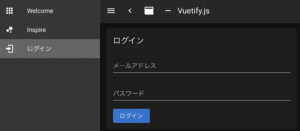
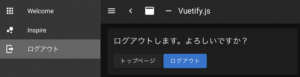
layouts/default.vue を変更
      <v-list>
        <v-list-item
          v-for="(item, i) in items"
+          v-if="(item.loggedIn == null) || (item.loggedIn == $auth.loggedIn)"
          :key="i"
          :to="item.to"
          router
          exact
        >
<script>
export default {
  data () {
    return {
      clipped: false,
      drawer: false,
      fixed: false,
      items: [
        {
          icon: 'mdi-apps',
          title: 'Welcome',
-          to: '/'
+          to: '/',
+          loggedIn: null
        },
        {
          icon: 'mdi-chart-bubble',
          title: 'Inspire',
-          to: '/inspire'
+          to: '/inspire',
+          loggedIn: null
+        },
+        {
+          icon: 'mdi-login',
+          title: 'ログイン',
+          to: '/login',
+          loggedIn: false
+        },
+        {
+          icon: 'mdi-logout',
+          title: 'ログアウト',
+          to: '/logout',
+          loggedIn: true
        }
      ],
リファクタリング
これでも動くがlint掛けるとerrorになる。
$ yarn lint
  13:11  error  The 'items' variable inside 'v-for' directive should be
 replaced with a computed property that returns filtered array instead.
 You should not mix 'v-for' with 'v-if'  vue/no-use-v-if-with-v-for
v-forとv-ifは一緒に使わないでと。優先度の問題らしい。
【Vue.js】`v-for`, `v-if` を一緒に使うのは避けよう – Qiita
メッセージにあるcomputed property(算出プロパティ)を使ってしました。
      <v-list>
        <v-list-item
-          v-for="(item, i) in items"
+          v-for="(item, i) in displayItems"
-          v-if="(item.loggedIn == null) || (item.loggedIn == $auth.loggedIn)"
          :key="i"
          :to="item.to"
          router
          exact
        >
+  },
+
+  computed: {
+    displayItems () {
+      return this.items.filter(item => (item.loggedIn == null) || (item.loggedIn === this.$auth.loggedIn))
+    }
  }
}
</script>

“Nuxt.jsとRailsアプリのDevise Token Authを連携させて認証する” に対して1件のコメントがあります。